Procure-to-Pay Process: The Eight Steps, Where It Breaks, and What to Automate First
Procure-to-pay (P2P, or purchase-to-pay in the UK) is the process from asking to buy something to paying the supplier and posting it: requisition, approval, purchase order, goods receipt, invoice capture, three-way match, invoice approval, payment. It breaks at the invoice, so automate capture and matching first. Leave payment with a person.
Key Takeaway
Procure-to-pay (P2P, or purchase-to-pay in the UK) is the process from asking to buy something to paying the supplier and posting it: requisition, approval, purchase order, goods receipt, invoice capture, three-way match, invoice approval, payment. It breaks at the invoice, so automate capture and matching first. Leave payment with a person.
What is procure-to-pay (P2P)?
Procure-to-pay is the whole path a purchase takes through a business: someone asks to buy something, someone approves it, a purchase order goes to the supplier, the goods arrive, the invoice arrives, the invoice is checked against the order and the delivery, it is approved, and the supplier is paid and the cost posted to the ledger. In the UK and Ireland the same thing is often called purchase-to-pay. Both shorten to P2P.
P2P is wider than accounts payable. AP owns the second half, from the invoice landing to the payment going out. P2P adds the first half, the buying, because most AP problems start there: a PO that was never raised, a delivery nobody booked in, a price agreed by phone and never written down.
Where does your procure-to-pay process stop?
Bring your monthly invoice count and your three most common exceptions to a 20-minute call. A chartered accountant who has signed off AP will tell you what a build on your ERP would match, what stays with a person, and what it would cost.
“Reza had some great suggestions and we ended up with a plan much better than what I was thinking of.”
What are the eight steps of the procure-to-pay process?
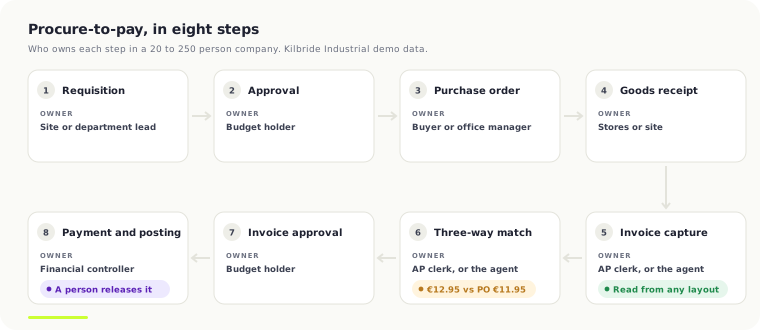
Every P2P process has the same eight steps, whatever the ERP. What changes from one company to the next is who does each one and how much of it happens on paper. The owners below are typical for a business of 20 to 250 people with one finance team.
| Step | What happens | Usual owner | Document it leaves |
|---|---|---|---|
| 1. Requisition | Someone asks to buy goods or a service | Site, depot or department lead | Requisition, or an email |
| 2. Approval | The spend is checked against budget and authority limits | Budget holder | Approved requisition |
| 3. Purchase order | The order goes to the supplier with quantities and agreed prices | Buyer or office manager | Purchase order (PO) |
| 4. Goods receipt | What actually arrived is counted and booked in | Stores, warehouse or site | Goods receipt note (GRN) |
| 5. Invoice capture | The supplier's invoice is read into the system | AP clerk | Unposted purchase invoice |
| 6. Three-way match | Invoice lines are checked against the PO and the GRN | AP clerk | Match result, or an exception |
| 7. Invoice approval | Exceptions and non-PO invoices go to the person who owns the spend | Budget holder | Approved invoice |
| 8. Payment and posting | The invoice posts to the ledger and is paid to terms | Financial controller | Posted invoice, payment run |
Steps 5 and 6 are where an AP team spends its week. Steps 1 to 4 decide how hard 5 and 6 will be: an invoice with a PO number and a booked receipt matches in seconds; one without either becomes a chase round the business. Our three-way matching guide covers step 6 in detail.
Where does the procure-to-pay process break?
It breaks at the invoice. Suppliers send whatever layout their system produces, the PO number is missing or in the wrong place, the price on the invoice is not the price on the order, and the receipt was never booked. The complaints finance teams leave about AP software say the same thing in their own words. Four of them, each read in full on the review site:
"There were two instances where Stampli incorrectly coded an invoice to a different vendor based on the invoice format. It did not pick up the vendor name listed on the invoice and assumed it was for an entirely different vendor."
Capterra, Stampli review, Accounting Manager, February 2025
"There are few downsides, but the "bot" that scans bills and auto-fills accounting fields sometimes struggles with unusually-formatted vendor invoices (i.e., hand written, etc.), or to distinguish between vendors with identically formatted invoices."
Capterra, Stampli review, Accounting Specialist in construction, November 2024
"It also lacks any OCR capability to extract a PO number from an invoice, meaning if the PO number isn't present it won't detect that automatically or send the supplier a notification asking them to add it."
Software Finder, Tipalti review, financial services company of 101 to 500 staff, February 2025
"No audit trail of approvals on payment run, have to open procurement (time consuming as above) to ensure correct approval workflow."
Capterra, Tipalti review, Senior Finance Manager, February 2025
Read together, they map onto the steps. Layouts and wrong suppliers are step 5. A missing PO number breaks step 6 before it starts. A missing audit trail is step 8, and it is the one an auditor asks about first. None of them is a payment problem.
How much does the procure-to-pay process cost?
The average business spends $9.90 and 11.6 days to process one supplier invoice. Only 38.3% of invoices go straight through with no human touch, and 19.9% stop as exceptions.
Ardent Partners, AP in 2026: Performance, Payments, and the Path Forward. Source
- Best in class: Ardent's lowest-cost fifth pay $2.67 an invoice against $12.50 for everyone else source.
- Median: APQC's cross-industry median is $6.00 per AP invoice, from 5,846 organisations source.
- Productivity: APQC's median is 12,000 invoices a year per AP full-time equivalent source.
The gap between $2.67 and $12.50 is almost all manual handling at steps 5 and 6, not software prices. Every figure, with its date, is on our cost per invoice benchmarks page. To put your own numbers against them, use the AP cost per invoice calculator.
What should you automate first in procure-to-pay?
Automate invoice capture and matching first, steps 5 and 6. That is where the hours go, where the errors start and where the evidence for the auditor is made or lost. In order:
- Capture from any layout. Every invoice read from email, PDF, scan or EDI into the same fields, with the supplier confirmed against your supplier list by VAT number and bank details, not by how the page looks.
- Duplicate and fraud checks before the queue. Same supplier, same amount, near dates; a changed bank account; a supplier nobody has paid before. Caught before anyone approves anything.
- Line-level matching within your tolerances. Each invoice line against the PO line and the receipt, with a price and quantity tolerance you set per supplier. Inside it, the invoice goes through. Outside it, it stops with the reason in plain words.
- A review queue for the exceptions. The person sees the invoice, the PO and the receipt side by side and settles it in one click: use the PO price, accept the supplier's price, ask for a credit.
- Posting with a decision log. The approved invoice posts to the ERP through its own API, and every decision is kept with its evidence: which document, which PO line, which tolerance, who approved, who overrode what.
Do not start with payment. Payment is the step where a mistake leaves the building and cannot be pulled back, and it is the step your bank and your ERP already do well. The agent should never be able to pay. It reads, matches, flags and drafts; a person releases the payment run from the ERP or the bank, as they do today. That one rule is most of what makes AP automation something an auditor will sign off. The full list of controls is on the accounts payable automation page.
Requisitions and POs (steps 1 to 3) come second. If your POs live in a spreadsheet or an inbox, purchase order automation is worth doing, but it only pays off once the invoice side can use the PO it creates.
How does procure-to-pay work on Business Central, Sage, NetSuite, Xero and QuickBooks?
Each ERP covers part of the eight steps itself. What follows is what each one does natively, read on the vendor's own help pages on 7 November 2026, and what it leaves to people.
Dynamics 365 Business Central. Purchase orders, receipts and purchase invoices are all native, and Microsoft's Payables Agent now reads PDF invoices from a shared mailbox, proposes the PO lines and creates a draft for a person to review; it never posts source. Business Central checks quantity, receipt and unit of measure on the match, and raises a Price difference warning when the price is off by more than one company-wide percentage. You do not have to clear that warning to finalise the draft source. What it leaves to people: tolerances per supplier and per line that hold an invoice, invoices that are not PDFs by email, and a decision log an auditor can read. More on AP automation on Business Central.
Sage 200 and Sage 50. Sage 200 has purchase order processing with purchase order and invoice authorisation, requisitions, and matching an invoice to the order, including disputing an invoice during matching; Sage 50 has none of the authorisation steps source source. Sage's own comparison names no price or quantity tolerance, so variances are settled by hand. What it leaves to people: capture, tolerance rules and the exception queue. Edition by edition on AP automation for Sage.
NetSuite. NetSuite matches vendor bills to POs and item receipts through a SuiteApp workflow with tolerances per item and vendor, but Oracle's documentation says item receipts that have been partially received are not supported source. Bill Capture is a paid add-on. What it leaves to people: partial deliveries, the long tail of layouts and approvals for staff who never log in. More on NetSuite AP automation.
Xero. Xero raises purchase orders and copies them to a bill, up to 25 at a time, and marks them as billed source. There is no goods receipt record, so there is nothing to three-way match against; part deliveries are handled by billing part of the order source. What it leaves to people: the receipt, the match and the tolerance. Where receipts live in Cin7 or a warehouse system, the match has to happen outside Xero.
QuickBooks Online. QuickBooks links a purchase order to a bill, but it does not compare quantities or prices between the two, and it has no goods receipt source. What it leaves to people: everything in step 6. Tool by tool on QuickBooks AP automation.
What does a procure-to-pay exception look like? A worked example
This example is in our public AP demo, on fictional data for Kilbride Industrial Supplies, a Tullamore distributor. You can open the invoice and settle it yourself.
- Purchase order. PO-10431 goes to Atlas Safety Equipment for 25 white vented EN 397 safety helmets at €11.95 each, with safety boots and ear defenders on the same order.
- Goods receipt. Stores book in all 25 helmets. The receipt agrees with the PO.
- Invoice capture. Atlas's invoice ASE-7731 arrives by email as a PDF. Supplier, invoice number, PO number and every line are read off the page; the supplier is confirmed against the supplier list.
- Three-way match. Boots and ear defenders match on quantity and price. The helmet line does not: €12.95 billed against €11.95 on the PO, 25 units, €25.00 over. That is outside tolerance, so the invoice stops.
- Exception. The review queue says, in words: "Unit price €12.95 billed vs €11.95 on the PO (+€25.00 on the line)." The reviewer has the PDF, the PO line and the receipt on one screen and two buttons: use the PO price, or accept the supplier's price.
- Decision and posting. The reviewer chooses the PO price and asks Atlas for a €25.00 credit. The other lines were never in question. The invoice posts at the agreed price, and the log keeps the reason, the evidence and the name.
Nobody keyed a line, and nobody had to notice the helmet price; the match did. A person spent one click on the €25.00 that mattered. Across 1,500 invoices a month that difference is the whole job.
Who should own the procure-to-pay process?
One person should own the whole process, usually the financial controller, even though five or six people touch it. The controller sets the authority limits, the tolerances and the rules for non-PO spend, and reads the exception numbers each month. Buyers own steps 1 to 3, stores own step 4, AP owns 5 to 7. If nobody owns the whole thing, each team fixes its own step and the invoice still arrives without a PO number.
Three numbers tell the owner whether it is working: the touchless rate (invoices that posted with no human touch), the exception rate by reason (price, quantity, no PO, no receipt, duplicate) and the cost per invoice. If exceptions do not fall month on month, the fix is usually upstream in steps 1 to 4, not in the software.
Frequently Asked Questions
What is the difference between procure-to-pay and AP automation?
Procure-to-pay covers the whole purchase, from requisition to payment. AP automation covers the invoice half: capture, matching, approval and posting. Most businesses start with AP automation, because that is where the hours go, and add requisitions and purchase orders once the invoice side can use them.
What is the difference between procure-to-pay and source-to-pay?
Source-to-pay adds the steps before buying: finding suppliers, tendering, negotiating and contracting. Procure-to-pay starts once a supplier and price are agreed. A 20 to 250 person business rarely needs source-to-pay software; it needs the agreed price written on the PO so the invoice can be checked against it.
How long does it take to automate procure-to-pay?
Capture and matching on your existing ERP is usually weeks, not months, once the paid scoping has set the tolerances and approval rules. Requisitions and purchase orders take longer, because they change how people outside finance buy. Start with the invoice side and measure the touchless rate before going further.
What is a touchless invoice?
A touchless invoice is one that is captured, matched to the PO and receipt within tolerance, approved and posted without a person touching it. Ardent Partners puts the 2026 average at 38.3% of invoices. The rest need a person, usually for a price difference, a missing PO number or a missing receipt.
Does procure-to-pay automation work with Xero?
Yes, with one gap to close. Xero raises purchase orders and copies them to bills, but it has no goods receipt, so there is nothing to three-way match against inside Xero. The receipt has to come from your stock system, such as Cin7, and the match runs beside Xero before the bill posts.
Should the AI agent be allowed to pay suppliers?
No. The agent reads, matches, flags and drafts; a person releases the payment run from the ERP or the bank. Payment is the one step where a mistake leaves the business and cannot be pulled back, and keeping it with a person is most of what makes the process auditable.
Work out your own numbers
AP cost-per-invoice calculator
Work out what each supplier invoice costs you to process, and the annual gap to best-in-class.
Open the calculatorFree calculator · no email neededAutomation ROI calculator
Pick how fast you want automation to pay for itself and see the budget your hours saved will cover.
Open the calculatorCapture and matching first, payment stays with you
A fixed-price build on your own cloud for Business Central, Sage, NetSuite, Xero or QuickBooks: every invoice read, matched to the PO and receipt within your tolerances, exceptions to a person, posted with a full decision log. The agent cannot pay.
“Reza had some great suggestions and we ended up with a plan much better than what I was thinking of.”

Written by Reza Shahrokhi ACA
Chartered Accountant (Chartered Accountants Ireland) • Founder of FinTask • 8+ years in finance & automation
Reza is a Chartered Accountant and the founder of FinTask. He specialises in helping growing businesses automate accounts payable, invoice processing, and financial reconciliation using AI-powered tools integrated with Xero and QuickBooks.
More about the authorRelated Articles
Three-Way Matching in Accounts Payable: The Complete Guide
Three-way matching is the AP control that checks a supplier invoice against the purchase order and the goods receipt note, releasing payment only when all three agree on quantities, prices and supplier details. Use it for physical goods and inventory; two-way matching is enough for services, software and recurring payments. Software can automate it.
7 min readAP AutomationThe Complete Guide to Accounts Payable Automation (2026)
Accounts payable automation uses AI and workflow software to take supplier invoices from capture to payment with little manual work. It typically cuts processing costs by 60–80%, from EUR 14–24 to EUR 1.85–3.70 per invoice, and processing time from 17.4 to 3.1 days. Choose a system that integrates with your accounting software and roll out in phases.
17 min readAP AutomationAccounts Payable Invoice Workflow Automation
Accounts payable invoice workflow automation is software that takes a supplier invoice from arrival to payment without anyone keying it in. It captures and extracts the data, matches it to the purchase order and delivery, routes approval, schedules payment and files the audit trail. Typical results: about 78% lower cost per invoice and a 3-day cycle instead of 14.6.
10 min readERP Finance AutomationAccounts Payable Automation for Business Central and Dynamics 365 F&O
Business Central and D365 F&O know which purchase orders are open. They don't know that a supplier billed in cases when the PO ordered eaches, or that one damaged-parts credit memo on a consolidated invoice shouldn't hold up the other 49 lines. Here's the matching architecture that fixes that, from a production build.
13 min read