How to Automate Accounts Receivable: Seven Steps, Who Owns Each, and What to Automate First
To automate accounts receivable, start with the collections queue and reply reading, not a payment portal. Measure the ledger, pull clean data from your ERP, set a chase cadence by customer group, route disputes to named owners, date every promise to pay, escalate on rules, and keep a person approving every email until the drafts are right.
Key Takeaway
To automate accounts receivable, start with the collections queue and reply reading, not a payment portal. Measure the ledger, pull clean data from your ERP, set a chase cadence by customer group, route disputes to named owners, date every promise to pay, escalate on rules, and keep a person approving every email until the drafts are right.
What should you automate first in accounts receivable?
Automate the collections queue and reply reading first. That is where a credit controller's day goes: deciding who to chase from an aged-debt export, writing the email, reading what comes back, and remembering who promised what. It is also where cash sits.
Leave the payment portal for later. A portal helps customers who already mean to pay; the invoices that are stuck usually have a reason. One finance lead described the work like this:
"My AR team is 3 people and they are absolutely drowning. We spend hours of emailing customers about overdue invoices, manually matching payments that came in overnight, chasing missing PO numbers, and dealing with short-pays."
r/ERP, finance lead at a $180M distributor, 2026
Every item in that list is a queue problem before it is a technology problem: nobody can see, in one place, which invoices are blocked, by what, and whose move it is. Fix that first. Cash application and portals come after.
Want a second pair of eyes on your cadence?
Bring your aged-debt export and your current reminder schedule to a 20-minute call. A chartered accountant who has run credit control will tell you where the cadence, dispute routes and escalation tiers need work.
“Reza had some great suggestions and we ended up with a plan much better than what I was thinking of.”
What are the seven steps to automate accounts receivable?
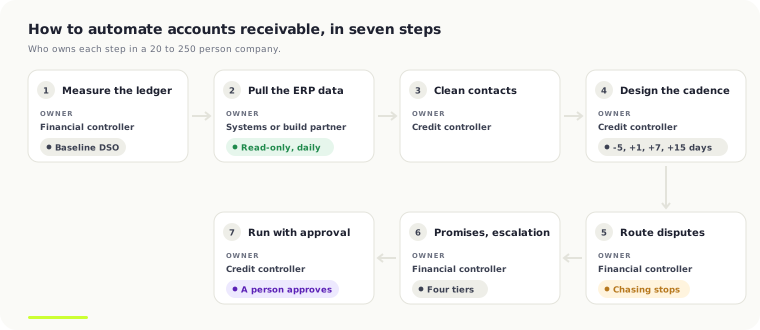
The same seven steps work on any ERP. The owners are typical for a business with one credit controller or a small AR team.
| Step | What you do | Owner |
|---|---|---|
| 1. Measure the ledger | Record DSO, overdue balance by age, open disputes and the share of overdue balance with a next action | Financial controller |
| 2. Pull the ERP data | Open items, due dates, credit notes, payments, contacts and PO references, read-only, every day | Finance systems or the build partner |
| 3. Clean contacts and groups | A named AR contact per customer; customers grouped by size, terms and risk | Credit controller |
| 4. Design the cadence | When each chase goes, by which channel, in what tone, and who approves it | Credit controller, signed off by the financial controller |
| 5. Route disputes | A route and a named owner for each kind of dispute; chasing stops while it is open | Financial controller with sales and operations |
| 6. Set promise and escalation rules | What counts as a promise, what happens when one breaks, who gets an account at each tier | Financial controller |
| 7. Run with approval, measure weekly | A person approves every draft; the step 1 numbers are read every week | Credit controller |
Steps 1 to 3 are the dull ones, and they decide whether the rest works. As one commenter in the same r/ERP thread put it: "Messy data = the AI just creates a new exception queue."
What data do you need from your ERP?
Five things, read every day, read-only:
- Open items. Every unpaid invoice with its number, date, amount, currency and balance left.
- Due dates and terms. As the ERP holds them, including any changed after the invoice went out.
- Credit notes and payments. So the agent never chases an invoice that has been credited or paid since the last run.
- Contacts. The person who pays, not the person who ordered. A wrong contact is one of the commonest reasons an invoice sits.
- PO references. Many customers' AP teams cannot pay an invoice without their own PO number on it.
Read it directly, not as a weekly export or a snapshot. The top complaint about AR tools in reviews is exactly this: "the way it takes a snapshot of NetSuite invoices rather than syncing directly (in case the invoice changes)" (G2 review of YayPay, reproduced by Upflow). On Business Central we read through its API or through Microsoft Fabric; on Sage, NetSuite, Xero and QuickBooks through their APIs. More on AR automation on Business Central.
How should you design the chase cadence?
Set one cadence per customer group, not one for everyone. A starting point for 30-day terms:
| When | Channel | Tone | Approval |
|---|---|---|---|
| 5 days before due | Friendly: a copy of the invoice, the PO number, how to pay | Can be auto-sent once an admin switches the template on | |
| 1 day after due | Polite reminder, all open items for that contact in one email | A person approves | |
| 7 days after due | Firm: asks for a payment date or the reason it is held | A person approves | |
| 15 days after due | Email and a call task | Final notice before escalation; statutory interest shown to the approver | A person approves |
| 30 days after due | Call by the account owner | Escalation tier 2: stop supply or agree a plan | Financial controller |
| 45+ days after due | Letter, then agency or solicitor | Formal | Financial controller; full history goes with it |
Three rules sit on top. No customer gets more than one chase a week, whatever the number of invoices. A promise or a dispute stops the cadence. And every chase goes from your own mailbox. The equipment rental build runs almost exactly this: a reminder the day after due, an overdue notice at seven days, a final notice at fifteen, then escalation, with a second daily pass for missed promise dates.
How should disputes be routed?
Disputes are where cash sits longest. Billtrust reports that about 55% of AR professionals call dispute management their hardest task (a vendor figure). Give each kind a route and a named owner before you automate anything:
| Dispute | Goes to | What closes it |
|---|---|---|
| Pricing | Account manager | The quote or contract price confirmed, or a credit note |
| Delivery | Operations or the depot | Proof of delivery sent, or a credit for what did not arrive |
| PO missing | Billing | The invoice re-sent with the customer's PO number |
| Credit note due | Accounts | The credit note raised and sent |
| Quality | Account manager with operations | A decision on a credit, a replacement or a rejection |
The rule that matters: nobody chases a disputed invoice until a person closes the dispute. If only part is disputed, ask for the rest at once. On a €96,400 hire invoice with €1,150 of delivery in dispute, the €95,250 nobody argued about should be paid now. The order-to-cash explainer walks through that example.
What counts as a promise to pay?
A promise to pay is a date and an amount from someone at the customer who can make it happen. "We'll look at it" is not a promise. "It's in Friday's payment run" is. Log each one against the invoice as a follow-up on the promised date plus two working days, for the bank to clear.
Track the promise kept rate: promises paid in full by the follow-up date, divided by promises that fell due. A customer below about 50% is telling you something, and their next promise should not stop the chase for as long. A broken promise moves the account up the queue at once. In the insurance services build, broken promises surface automatically after seven days instead of whenever someone remembers.
How should escalation work?
Escalate on rules, not on who shouts loudest. Score every customer each day on balance and days overdue together, so a large invoice at 60 days outranks a small one at 90. Then set tiers:
- Tier 1, credit controller. Routine chasing on the cadence.
- Tier 2, account owner. Over 30 days, a broken promise, or a balance over a limit you set. A call, not another email.
- Tier 3, financial controller. Over 45 days or two broken promises. Stop supply, agree a plan, or prepare a hand-off.
- Tier 4, agency or solicitor. A person decides. The full history of emails, replies, promises and disputes goes with it.
A US insurance services group we built for runs four tiers like this across 7,700 open invoices and $11.8M of receivables, with about $3M of the ledger at the executive tier. The collections platform case study shows the scoring.
What should you measure?
Four numbers, read weekly against the baseline from step 1:
- DSO: (accounts receivable ÷ revenue for the period) × days in the period. On €30M of annual revenue one day is about €82,000 of cash. Work out yours with the DSO calculator.
- CEI, the collection effectiveness index: (opening receivables + credit sales − closing total receivables) ÷ (opening receivables + credit sales − closing current receivables) × 100. It shows how much of what could be collected was, and moves faster than DSO.
- Days to first chase: from due date to the first reminder. If it is more than a few days, the queue is not working.
- Promise kept rate, as above.
Add one housekeeping number: the share of overdue balance with a live next action. It should be close to 100%.
What are the most common mistakes when automating accounts receivable?
- Chasing disputed invoices. The fastest way to upset a good customer. "A lot of AR 'collections work' is fake work. The invoice is 'overdue,' so everyone treats it like a payment problem" (r/Accounting, 2026).
- Reminders from a vendor's address. Customers read them as spam; one Upflow user said so in a Software Advice review in 2020 ("my address is different: reminders@upflow.io").
- Notes only at invoice level. A Chaser user on Software Advice had to "duplicate the same note for multiple client invoices manually". Keep notes at customer level too.
- Automating sends before the data is clean. A wrong contact, sent automatically, is still a wrong contact.
- One cadence for every customer. A key account and a one-off buyer should not get the same third reminder.
- No owner for disputes. Without a named owner a dispute waits, and so does the rest of the invoice.
If you want an agent to do the drafting and reply reading, the rules for what it should do alone and what a person approves are in AI collections agents. To compare the tools that sit on top of each ERP, see the AR automation software comparison; to see what we build, the accounts receivable automation page.
Frequently Asked Questions
How do you automate accounts receivable?
Measure the ledger, read open items, credit notes and contacts from your ERP every day, set a chase cadence by customer group, route each kind of dispute to a named owner, date every promise to pay, escalate on rules, and keep a person approving each email until the drafts are reliably right.
What part of accounts receivable should you automate first?
The collections queue and reply reading. Every overdue invoice gets an owner and a next action, chases are drafted for a person to approve, and replies are sorted into paid, promise, dispute or query. Payment portals and cash application come after, because the stuck cash belongs to customers with a reason not to pay.
How often should you chase an overdue invoice?
A common cadence on 30-day terms is a friendly note five days before due, a reminder the day after, a firmer email at seven days, a final notice at fifteen and a call at thirty. Cap it at one chase a week per customer, grouped into one email, and stop it on a promise or a dispute.
Can you automate accounts receivable in Business Central, Xero or QuickBooks?
Each can send reminders on a schedule: Business Central through reminder terms and Reminders Automation, Xero and QuickBooks through invoice reminders. None reads the replies, pauses a disputed invoice or tracks promises. That part needs a collections queue on top, reading the ERP read-only.
How long does it take to automate accounts receivable?
Steps 1 to 6 are mostly decisions and can be done in two to four weeks. A collections queue built on your existing ERP is usually weeks more, then two to three weeks of running with a person approving every draft. Large AR suites often quote six to twelve months.
What is a good collection effectiveness index?
CEI shows the share of collectable receivables you actually collected in a period. Above 80% is generally read as good and close to 100% as excellent. It moves faster than DSO, so it is the better weekly number while you change the process.
Work out your own numbers
DSO / cash release calculator
See how much cash is tied up in your receivables, and what pulling your DSO back by a few days is worth.
Open the calculatorFree calculator · no email neededAutomation ROI calculator
Pick how fast you want automation to pay for itself and see the budget your hours saved will cover.
Open the calculatorThe seven steps, built on your ERP
A collections queue on your own cloud: data read daily from your ledger, chases drafted for a person to approve, disputes routed to named owners, promises tracked, escalation on your rules. Fixed price after a scoping call.
“Reza had some great suggestions and we ended up with a plan much better than what I was thinking of.”

Written by Reza Shahrokhi ACA
Chartered Accountant (Chartered Accountants Ireland) • Founder of FinTask • 8+ years in finance & automation
Reza is a Chartered Accountant and the founder of FinTask. He specialises in helping growing businesses automate accounts payable, invoice processing, and financial reconciliation using AI-powered tools integrated with Xero and QuickBooks.
More about the authorRelated Articles
AI Collections Agents for B2B Receivables: What They Should Do Alone, What a Person Approves
Yes, an AI collections agent can run most of B2B chasing: it reads the ledger every day, drafts each chase, reads and sorts every reply, logs promises and pauses on disputes. A person should still approve what reaches the customer, and the agent should never pay, change terms, post to the ERP or contact a disputed account.
9 min readAR AutomationOrder-to-Cash Process: The Steps, Where Cash Gets Stuck, and What to Automate First
Order-to-cash (O2C) is the process from a customer's order to the cash landing in your bank and applied to the right invoice: order, credit check, fulfilment, invoicing, collections, dispute handling, cash application, reporting. Cash gets stuck in collections and disputes, so automate the chasing queue and reply reading first, with a person approving every email.
10 min readERP Finance AutomationAccounts Receivable Automation for Dynamics 365 Business Central
Business Central knows which invoices are open. It doesn't know who promised to pay, which dispute is blocking a six-figure payment, or whose turn it is to chase. Here's how mid-market teams close that gap -- with the architecture from two production builds, an $11.8M ledger and a €7.6M one.
14 min read