Order-to-Cash Process: The Eight Steps, Where Cash Gets Stuck, and What to Automate First
Order-to-cash (O2C) is the process from a customer's order to the cash landing in your bank and applied to the right invoice: order, credit check, fulfilment, invoicing, collections, dispute handling, cash application, reporting. Cash gets stuck in collections and disputes, so automate the chasing queue and reply reading first, with a person approving every email.
Key Takeaway
Order-to-cash (O2C) is the process from a customer's order to the cash landing in your bank and applied to the right invoice: order, credit check, fulfilment, invoicing, collections, dispute handling, cash application, reporting. Cash gets stuck in collections and disputes, so automate the chasing queue and reply reading first, with a person approving every email.
What is order-to-cash (O2C)?
Order-to-cash is the whole path a sale takes through a business: the customer orders, you check they are good for it, you deliver, you invoice, you collect, you sort out anything they dispute, you apply the payment to the right invoice and you report on it. It shortens to O2C. Quote-to-cash is the same process starting one step earlier, at the quote, and is the term sales software uses.
O2C is wider than accounts receivable. AR owns the second half, from the invoice to the cash. O2C adds the first half, because most late payments start there: a price agreed by the salesperson and never put on the order, a delivery charge the customer was told was included, an invoice sent to someone who left in the summer.
How much of your overdue balance is blocked, not late?
Bring your aged-debt export to a 20-minute call. A chartered accountant who has run credit control will tell you which invoices are stuck on a dispute, a missing PO or a wrong contact, and what a queue would do with them.
“Reza had some great suggestions and we ended up with a plan much better than what I was thinking of.”
What are the eight steps of the order-to-cash process?
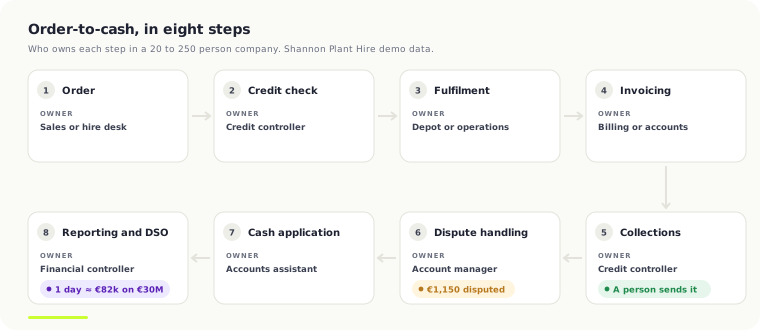
Every O2C process has the same eight steps, whatever the ERP. The owners below are typical for a business of 20 to 250 people with one credit controller or a small AR team.
| Step | What happens | Usual owner | Where it goes wrong |
|---|---|---|---|
| 1. Order | The customer orders, books or signs a hire agreement | Sales or hire desk | Price or terms agreed verbally, not on the order |
| 2. Credit check | Credit limit and account status checked before you supply | Credit controller | Skipped for good customers, who then stretch |
| 3. Fulfilment | Goods delivered, service done, plant on hire | Depot or operations | No proof of delivery, no customer PO number |
| 4. Invoicing | The invoice is raised and sent | Billing or accounts | Wrong contact, missing PO number, late |
| 5. Collections | Overdue invoices are chased on a schedule | Credit controller | Chasing from an aged-debt export, by memory |
| 6. Dispute handling | Queries and disputes are routed and settled | Account manager | Disputed invoices keep getting chased |
| 7. Cash application | Payments are matched to the invoices they pay | Accounts assistant | One payment for six invoices, no remittance |
| 8. Reporting | DSO, aged debt and cash forecast | Financial controller | DSO explained at the board, not managed |
Steps 5 and 6 are where cash sits. Steps 1 to 4 decide how much of it ends up there: an invoice with the right contact, the customer's PO number and the agreed price is paid on terms; one without them waits in somebody's inbox until it is chased.
Where does cash get stuck in order-to-cash?
In collections and disputes. Not because customers will not pay, but because nobody knows which invoices are blocked and why. Finance people describe it in their own words:
"My AR team is 3 people and they are absolutely drowning. We spend hours of emailing customers about overdue invoices, manually matching payments that came in overnight, chasing missing PO numbers, and dealing with short-pays."
r/ERP, finance lead at a $180M distributor, 2026
"A lot of AR 'collections work' is fake work. The invoice is 'overdue,' so everyone treats it like a payment problem."
r/Accounting, 2026; the thread argues most overdue invoices are blocked by disputes, missing POs or wrong contacts
"Track follow-ups in a spreadsheet? When they promised to pay?"
r/quickbooksonline, on what to do when automatic reminders fail, 2026
"The only issue I have with Upflow is that our customers/agents often perceive my emails as a spam, seeing that my address is different: reminders@upflow.io"
Software Advice, Upflow review, September 2020
Four ways cash gets stuck, then. Chasing from an aged-debt export, so nobody knows what was said last. Disputes that block payment while the chasing carries on regardless. Promises tracked by memory, so a broken promise is noticed a month late. And reminders that upset the customer: sent from a stranger's address, or a firm third reminder on an invoice the customer has already queried.
How do you calculate DSO, and what is a day of it worth?
Days sales outstanding is the number that tells you how well order-to-cash is working. It is the average number of days between invoicing and being paid:
DSO = (accounts receivable ÷ revenue for the period) × days in the period
On €30M of annual revenue, one day of DSO is €30,000,000 ÷ 365, about €82,000 of cash sitting with customers instead of in your bank. Ten days is €820,000. That is why DSO is a board number.
The cross-industry median DSO, from 13,195 organisations. Irish businesses waited an average of 61 days to be paid by other businesses in 2024, nine days longer than the year before.
APQC Open Standards Benchmarking; EU Payment Observatory Annual Report 2025, Ireland profile. Source
The Irish figure is from the EU Payment Observatory source. Medians by sector, every one sourced, are on our DSO benchmarks by industry page. To see what cutting your own DSO would release, at your cost of capital, use the DSO calculator.
What should you automate first in order-to-cash?
Automate the collections queue and reply reading first, steps 5 and 6. Not the customer payment portal: portals help customers who already intend to pay, and the cash that is stuck belongs to customers who have a reason not to. In order:
- A queue, not an export. Every overdue invoice gets an owner, a next action and a date, read straight from your ERP each day. Nothing lives in a spreadsheet or a personal inbox.
- Chases drafted, a person approves. The agent drafts each chase from the ledger and the history; the credit controller approves, edits or holds it, and it goes from your own mailbox.
- Replies read and sorted. Every reply is read and filed as paid, promise to pay, dispute, query, contact change or bounce, and each one creates the next step.
- Disputes routed, chasing stopped. A disputed invoice goes to the account owner with the thread attached, and nobody chases it until a person closes the dispute.
- Promises dated. A promise to pay becomes a follow-up on the promised date, and a broken promise moves the account up the queue.
The safety points matter more here than in AP, because every mistake lands with a customer. Nothing is sent without a person approving it; auto-send exists only for templates an admin switches on, one at a time. The agent never promises a discount, extended terms or a write-off. A disputed invoice is never chased. Every email, reply, promise and note is logged against the invoice and the customer. Your ERP stays read-only, and escalation runs on rules you set to named people. The full list is on the accounts receivable automation page.
How does order-to-cash work on Business Central, Sage, NetSuite, Xero and QuickBooks?
Every ERP can send a reminder. None of them runs a collections queue. What each does natively, read on the vendor's own help pages on 7 November 2026:
Dynamics 365 Business Central. Reminder terms with levels that set when each reminder is issued, what fee to charge and whether to add interest, with a grace period source, and a Reminders Automation page that creates, issues and sends them on a cadence source. What it leaves to people: reading the replies, pausing a disputed invoice, tracking promises and deciding who to call. More on AR automation on Business Central.
Sage 50 and Sage 200. Sage 50 Accounts Professional (v32.1 and above) has Automated Payment Reminders in Sage Copilot's debt management, sending invoices and statements on criteria you set source. Sage 200 has customer statements, aged debtors reports under Credit Control and Invoice Payments, which puts a Pay Now button on the emailed invoice source. What it leaves to people: replies, disputes and promises.
NetSuite. The Dunning Letters SuiteApp runs dunning evaluations on a schedule at customer, invoice or invoice-group level and emails or prints the letters; you buy it through your NetSuite account manager source. Oracle notes it cannot detect bounced emails source. What it leaves to people: everything after the letter is sent.
Xero. Invoice reminders for overdue invoices and for invoices coming due, with editable wording source. What it leaves to people: anything that depends on what the customer said back.
QuickBooks Online. Automatic invoice reminders scheduled up to 90 days before or after the due date, with a personalised message source. What it leaves to people: the same as Xero. If a reminder tool is enough for you, the AR automation software comparison covers the ones that sit on top of each ERP.
How does a dispute hold up cash? A worked example
On a €30M rental group's ledger we found a €1,000 dispute holding up a €100,000 invoice. The other €99,000 was not in question, but nothing was paid until the €1,000 was settled. The same shape is in our public AR demo, on fictional data for Shannon Plant Hire, so you can open it and look:
- Invoice. Kinsale Civil Engineering is invoiced €96,400 for a month's hire: three 20-tonne excavators, a dumper, 84 operator hours, and €1,150 for delivery and collection by low loader.
- Chase. Once it is overdue, the queue drafts each reminder on the cadence and Niamh, the credit controller, approves it before it goes.
- Reply read. The customer replies: "We are not paying a delivery charge we were told was included. The rest is fine." The reply is matched to the invoice by the email thread and read as a dispute.
- Chasing paused, dispute routed. Chasing stops on that invoice. The dispute goes to Pádraig, the account manager for Munster, with the thread attached: reason delivery, €1,150 disputed of €96,400.
- Settled. Pádraig checks what was quoted, and either a credit note for the €1,150 is raised or the quote is sent back. Once he closes the dispute, the chase resumes on what is left, and the €95,250 nobody argued about is asked for at once.
- Logged. Every email, the reply, the dispute and the decision sit against the invoice and the customer, for whoever picks up the account next.
Without the queue, the third reminder goes out on a €96,400 invoice the customer has already said it will pay, less €1,150. That is how a reminder upsets a good customer, and how €95,250 sits for another month.
Who should own the order-to-cash process?
The financial controller should own it end to end, with the credit controller running steps 5 to 7 day to day. Sales owns the order and the price, operations owns proof of delivery, and account managers own disputes on their accounts. If nobody owns the whole thing, credit control chases what sales agreed and operations never wrote down.
Four numbers tell the owner whether it is working: DSO month on month, the share of overdue balance with a live next action, promises kept as a share of promises due, and disputes open by age and owner. If DSO does not move, look at steps 1 to 4 before blaming the chasing.
Frequently Asked Questions
What is the difference between order-to-cash and accounts receivable?
Order-to-cash covers the whole sale, from the customer's order to the cash applied in your ledger. Accounts receivable covers the second half: invoicing, collections, disputes and cash application. Most late payments start in the first half, with a price, contact or PO number that never reached the invoice.
What is the difference between order-to-cash and quote-to-cash?
Quote-to-cash starts one step earlier, at the quote or proposal, and is the term CRM and billing software use. Order-to-cash starts when the order is placed. For a finance team the difference matters only if prices agreed at the quote stage are not carried onto the order and the invoice.
What is a good DSO?
APQC's cross-industry median is 38 days, and its top quarter collect at or below 30 days. A good DSO is close to your own payment terms: with 30-day terms, a DSO of 45 means customers pay two weeks late on average. Sector medians are on our DSO benchmarks page.
What should you automate first in order-to-cash?
The collections queue and reply reading. Every overdue invoice gets an owner and a next action, chases are drafted for a person to approve, replies are sorted into paid, promise, dispute or query, and disputed invoices stop being chased. Payment portals and cash application come after.
Can an AI agent send collection emails on its own?
It can, but it should not by default. The safer pattern is that the agent drafts each chase and a person approves it, with auto-send switched on only for templates an admin approves one at a time. The agent should never offer discounts, extended terms or write-offs.
How long does it take to automate order-to-cash?
A collections queue on your existing ERP is usually weeks, once the paid scoping has set the chase cadence, escalation rules and who owns disputes. The ERP stays read-only, so nothing in your ledger changes. Credit checks and cash application can follow once the queue is running.
Work out your own numbers
DSO / cash release calculator
See how much cash is tied up in your receivables, and what pulling your DSO back by a few days is worth.
Open the calculatorFree calculator · no email neededAutomation ROI calculator
Pick how fast you want automation to pay for itself and see the budget your hours saved will cover.
Open the calculatorCollections from a queue, not an aged-debt export
Chases drafted for a person to approve, replies read and sorted, disputes routed and paused, promises dated, on your own cloud with your ERP read-only. Fixed price after a scoping call.
“Reza had some great suggestions and we ended up with a plan much better than what I was thinking of.”

Written by Reza Shahrokhi ACA
Chartered Accountant (Chartered Accountants Ireland) • Founder of FinTask • 8+ years in finance & automation
Reza is a Chartered Accountant and the founder of FinTask. He specialises in helping growing businesses automate accounts payable, invoice processing, and financial reconciliation using AI-powered tools integrated with Xero and QuickBooks.
More about the authorRelated Articles
Best Accounts Receivable Automation Software Compared
AR automation software ranges from free (Xero's built-in features) to EUR 100,000+/year for enterprise platforms like HighRadius. For Xero users, Chaser is the best overall tool, Paidnice and Credit-IQ start from EUR 29/month, and GoCardless charges 1-2% per payment. This comparison covers ten tools with real pricing and recommendations by business type.
24 min readERP Finance AutomationAccounts Receivable Automation for Dynamics 365 Business Central
Business Central knows which invoices are open. It doesn't know who promised to pay, which dispute is blocking a six-figure payment, or whose turn it is to chase. Here's how mid-market teams close that gap -- with the architecture from two production builds, an $11.8M ledger and a €7.6M one.
14 min readAP AutomationProcure-to-Pay Process: The Steps, Where It Breaks, and What to Automate First
Procure-to-pay (P2P, or purchase-to-pay in the UK) is the process from asking to buy something to paying the supplier and posting it: requisition, approval, purchase order, goods receipt, invoice capture, three-way match, invoice approval, payment. It breaks at the invoice, so automate capture and matching first. Leave payment with a person.
10 min read